
For your health.
Bring months of sleep, heart rate and activity into a spreadsheet. Explore your history in your own tools.
Open your first spreadsheet

Apple Health, on your terms
From your wearable to a spreadsheet or your own system. Export your Apple Health history and explore it in the tools you choose.
 See how it works
 iPhone app · iOS 18 or newer · currently free · Austria, Germany, Switzerland & Luxembourg
The app’s interface is German — the guides on this site quote the German button labels.
Not in your country yet?
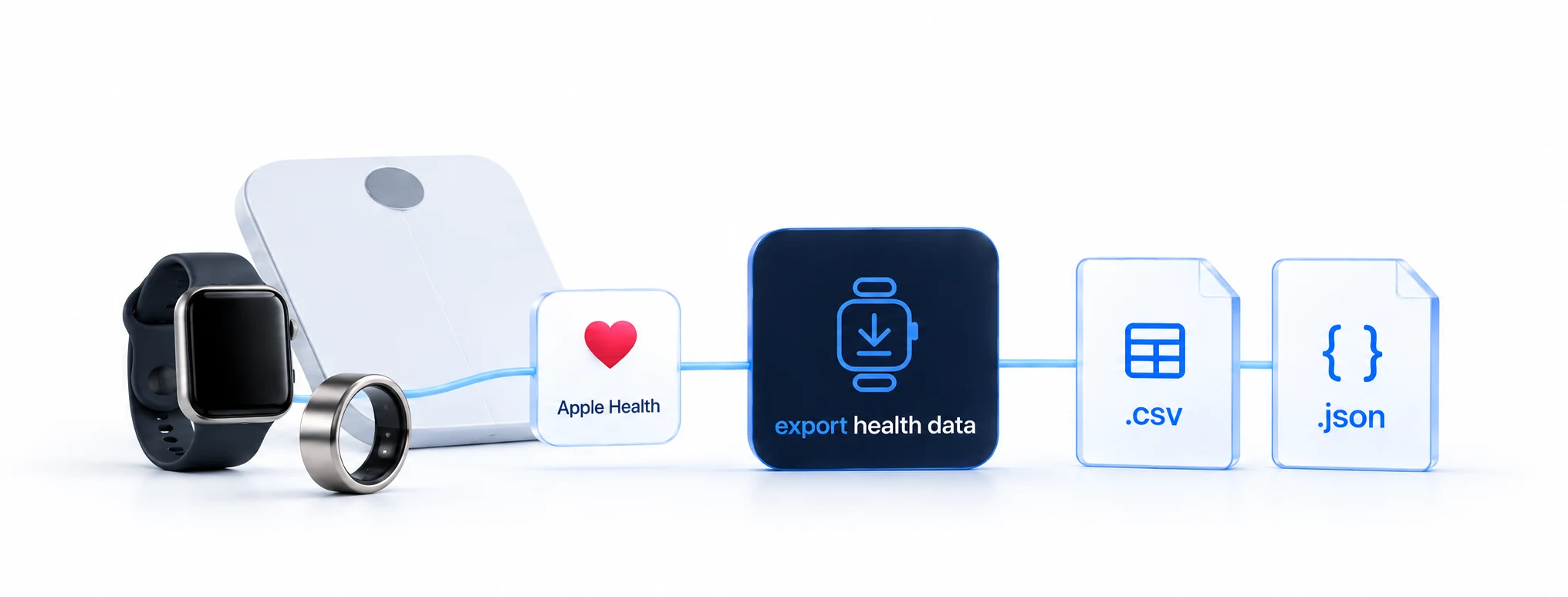
One connection through Apple Health.
More ways to use your data.
Available values depend on what your device shares with Apple Health.
Bring months of sleep, heart rate and activity into a spreadsheet. Explore your history in your own tools.
Open your first spreadsheet
Send supported metrics to a destination you configure, in a documented JSON format.
Read the documentationNo account.
No tracking.
No servers of ours.
For anyone who wants to use their Apple Health data outside the iPhone — with no account and no cloud service in between.
Watch, ring, band or scale — devices with their own app (e.g. Garmin Connect, Oura, WHOOP, Withings) store their values in Apple Health once you have allowed that in their app; which values they store is up to their maker. The iPhone stores its steps by itself. Export Health Data picks your data up right there: 188 data types. For sleep, one source per night so nothing is counted twice; the daily step total is taken unchanged from Apple Health — your numbers match the Health app.
Watch, ring, band, scale, or just your iPhone — if your device writes its values into Apple Health, Export Health Data picks them up there: as a spreadsheet for Excel and Numbers, to your dashboard or your own server. An iPhone app with no account and no servers on our side. For longevity enthusiasts, developers and self-hosters.
Now in the App Store in Austria, Germany, Switzerland and Luxembourg. The app’s interface is German — the guides on this site quote the German button labels, so you can follow them without knowing the language.
30 days, 90 days, or a full year — Excel, Numbers, and Google Sheets open the file directly, with the right number format: decimal comma for German-speaking regions, decimal point for US format, chosen automatically from your device settings. For your own analysis, for your doctor or coach, or as a long-term record.
The app delivers to your endpoints in the background, without you having to open it. Two things have to come together for that:
iOS has to start the app. On battery it gives apps only a little background time; plugged in to charge, that limit does not apply.
The iPhone has to be unlocked. While it is locked, iOS hands out no health data — plugged in to charge just the same. At night that is almost always the reason nothing arrives.
It becomes reliable with an automation in Apple’s Shortcuts app: it sends as soon as you close your device’s app — and you have unlocked the iPhone to open that app anyway. With an Apple Watch or iPhone only, pick a fixed time of day instead, one when you are already up.
The log records every attempt: “Delivered” when your destination has confirmed receipt, “Deferred – iPhone locked” when it could not go out — those values come along with the next delivery. If nothing arrives for hours, the app tells you; you choose the window. Your iPhone schedules and shows that notification, with no server involved.
Illustrative delivery log
An AI assistant such as Claude gets your current numbers and answers questions about them — “How was my night? What should I pay attention to today?” With a guided setup and ready-made routines. Technically, the connection uses MCP, an open standard for AI tools; the MCP server ships as open source.
In development — ships as an app update.
A calm night: 7:12 h of sleep, HRV 41 ms — above your 30-day average. Resting heart rate 56. A good day for zone 2; yesterday was only 9,182 steps.
No account, no tracking, no servers on our side. Your data leaves your iPhone only to destinations you set up yourself — which is why the App Store label says “Data Not Collected”. Developed by healthspan GmbH in Vienna, EU.
File export: 188 data types from Apple Health, as CSV in EU or US dialect, JSON or NDJSON — machine formats always use point decimals. Automatic delivery: a single HTTPS POST to your endpoint carrying the twelve core families — steps, resting heart rate, HRV, VO₂max, weight, body fat, lean mass, respiratory rate, SpO₂, sleeping wrist temperature, heart rate as daily min/avg/max, and the sleep night — with a custom auth header and a documented JSON format; see Set up a destination and the format reference.
A guide for every use case: open your spreadsheet, deliver to your own server, Home Assistant, Grafana, and the format reference.
Missing a guide? Write to contact@healthspan.eu.
Find the details on your data, devices and delivery.
15 questions
Export Health Data delivers your Apple Health data to where you use it: as a spreadsheet for Excel, Numbers or Google Sheets, and automatically to a destination of your choice — for example an address someone gave you, or an analysis of your own on the web. Everything runs on your iPhone: no account, no servers on our side, no usage tracking.
Only to destinations you add yourself. There is no account, no servers on our side, and no usage tracking. Delete the app and your data, destinations, and log are gone. An access key you stored can remain in the iOS Keychain — delete the destination in the app first and its key goes with it.
A destination is an internet address that accepts your data automatically — for example an address someone gave you (nutrition counselling, a doctor’s practice, a trainer), or something of your own: a dashboard (your own analysis page on the web), an automation, or a server you run yourself. We run none and give you none — the app has no servers, and that is deliberate. If you don’t have anything like that, you don’t need a destination: then the “Export” tab is your way — create a file and share it. The full guide is in the Info tab under “Wie richte ich ein Ziel ein?” (How do I set up a destination?).
Delivered means: the destination confirmed receipt (technically: response code 200 to 299). If your address redirects, that does not count as a delivery but as an error. Everything else is called by its name in the log. “Fehlgeschlagen” (Failed): with the reason — the app tries again the next time it runs; if it says “Ziel bittet um Pause” (destination asks for a pause), the destination is currently getting too many requests, and the app waits before trying again. “Aufgeschoben – iPhone gesperrt” (Deferred – iPhone locked): caught up at the next delivery. “Unverändert” (Unchanged): nothing new since the last delivery, so nothing was sent. “Abgebrochen” (Aborted): iOS ended the app before anything reached the destination — the next delivery includes those days again.
While your iPhone is locked (from about ten minutes after locking), iOS releases no health data — no app may read it then. That’s not an error: at the next delivery the app catches up on the reading — with the Shortcuts automation a few minutes after you close your device’s app, or at the fixed time, provided your iPhone is unlocked then; otherwise when you open the app or when iOS starts it in the background (on battery iOS rarely does so, plugged in more often).
The apps of many devices store their data in Apple Health as well. Add it all up blindly and you count twice. This app doesn’t add anything up itself: Apple Health works out the daily total itself and counts steps that, say, your watch and your iPhone measured at the same time only once — exactly the number the Health app shows. So all your devices feed in, without being counted twice. If your destination also pulls a maker’s data directly from that maker, it receives those values twice — the app doesn’t filter by maker; that is for your destination to handle.
No — neither open nor visible in the background. iOS starts the app by itself, even after an iPhone restart — there, though, only after the first unlock, because until then iOS releases no health data. When iOS starts it in the background is up to iOS (on battery, iOS rarely starts apps by itself). That is why we recommend the Shortcuts automation (next question). Just avoid one thing: swiping the app away upwards in the app switcher (swipe up from the bottom and hold). After that, iOS no longer starts it by itself until you next open the app — that applies to every health app.
For the spreadsheet in the “Export” tab: never. For automatic sending: no — but we recommend it. Without an automation the app sends only when you open it and when iOS starts it by itself; on battery iOS rarely does so, plugged in more often. An automation, by contrast, runs as your own action, regardless of whether iOS starts the app — the iPhone still has to be unlocked, otherwise iOS releases no health data. Apple Watch or iPhone only: your values land in Apple Health by themselves; if you want a reliable sending time: the Shortcuts app (“Kurzbefehle”) → Automation → Time of Day → “Gesundheitsdaten senden” (Send health data) — pick a time when you are already up, because with the iPhone locked iOS releases no health data to the automation either. Device with its own app (e.g. Garmin Connect, Oura, WHOOP, Withings): the Shortcuts app (“Kurzbefehle”) → Automation → App → your device’s app → “Wird geschlossen” (Is Closed) → “Gesundheitsdaten senden” (Send health data). Then your new values reach the destination within a few minutes of you closing your device’s app; wait until that app shows the new values before you close it — only then are they in Apple Health, and leave the iPhone unlocked for a few seconds afterwards. If you additionally have a device with its own app — a scale, say — set up “Wird geschlossen” for its app; the iPhone’s steps are included in every delivery. Both guides are in the “Senden” (Send) tab, step by step.
Your night — sleep, resting heart rate and whatever else your device measures overnight — arrives in Apple Health at a different time depending on the device. An Apple Watch stores the night by itself, usually minutes after you get up. Devices with their own app (e.g. Garmin Connect, Oura, WHOOP, Withings) usually transfer their values only when you open their app; some also by themselves in the background. As soon as the night is in Apple Health, Export Health Data sends it as soon as the iPhone is unlocked — Apple Watch: at the fixed time of your automation, pick one when you are already up; device with its own app: with the “Wird geschlossen” (Is Closed) automation a few minutes after you close your device’s app; without an automation: when iOS starts the app and the iPhone is unlocked at that moment.
For two reasons that apply to every device: the night (sleep, resting heart rate and whatever else your device measures overnight) is usually in Apple Health only in the morning — and while the iPhone is locked (from about ten minutes after locking), iOS releases no health data; no app may read it then, this one included — being plugged in changes nothing about that. If you wear a device with its own app (e.g. Garmin Connect, Oura, WHOOP, Withings): it usually transfers its values only when you open its app in the morning; an Apple Watch usually stores the night minutes after you get up. So sending happens in the morning — device with its own app: with the “Wird geschlossen” (Is Closed) automation within a few minutes of you closing your device’s app; Apple Watch or iPhone only: at the fixed time of your automation, one when you are already up and unlock your iPhone; without an automation: as soon as iOS starts the app and the iPhone is unlocked at that moment. Device with its own app: wait until your device’s app shows the night before you close it — only then is it in Apple Health.
On battery, iOS gives apps only a little background time (time in which an app may run without you having opened it), and that for all apps together — once it is used up, iOS starts no app for health data on battery, no matter how often you had the iPhone in your hand. Plugged in, that limit does not apply — but charging only helps with the starting: while the iPhone is locked, iOS releases no health data, on the cable just the same. Overnight it is therefore almost always the lock that is the reason, not the battery. What you can check: the iPhone unlocked at the time you expected something; battery not nearly empty; Low Power Mode off; Background App Refresh on for the app (Settings → General → Background App Refresh → Export Health Data). What bypasses the battery limit entirely: the automation in the “Senden” (Send) tab — it runs as your own action, not at the system’s discretion; the iPhone still has to be unlocked.
Because no device stored them in Apple Health. Which values a device stores in Apple Health is up to its maker — and the lists differ. Two examples: Oura, for instance, stores sleep, heart rate and respiratory rate, but no HRV. WHOOP additionally stores resting heart rate and blood oxygen, likewise no HRV. Whether yours is among them is shown by “Datenquellen prüfen” (Check data sources) in the Info tab — and, if you have a destination, by the “Dein Gerät liefert” (Your device provides) card in the “Senden” (Send) tab. Wrist temperature during sleep is stored only by newer Apple Watch models (Series 8 and Ultra onwards), and only after a few nights with Sleep Focus switched on (a setting of the Apple Watch). The app sends what is in Apple Health — an empty row means: no device stored this value.
Most likely the app may only read recent history. Since iOS 27, when you grant Health access, iOS also asks how far back an app may read: the whole history or only recent values. If you chose recent values, the app cannot see older ones — the spreadsheet then starts on the day from which it may read, even if you chose a longer period. The app tells you so after every export and under “Datenquellen prüfen” (Check data sources) in the Info tab, each time with the date. You can change it in the Health app: profile picture top right → Apps → Export Health Data → set the history to “gesamt” (all) there. For automatic sending, recent values are enough — it only needs the last few days.
The spreadsheet comes as a CSV file — Excel, Numbers and Google Sheets open it. Numbers and separators follow your iPhone’s setting (for example 36,9 with a semicolon in Austria and Germany, 36.9 with a comma in Switzerland). If everything ends up in a single column after opening, or decimal numbers turn into text, the separator does not match your program: switch it to EU or US under “Erweiterter Export” (Advanced Export). For dashboards and servers (this concerns the person who runs your destination): JSON and NDJSON as a file; the automatic delivery sends JSON in a documented format — the description is on exporthealthdata.com.
Everything is free at the moment, and there are no purchases in the app. Should that change, it will be stated here and on the App Store beforehand — no surprises.
No matching questions. Try a different search or clear the field.
Now in the App Store in Austria, Germany, Switzerland and Luxembourg — other countries: join the list and we’ll tell you when the app is available in yours. One email, no newsletter. The app’s interface is German; the guides on this site quote the German button labels.